Perplexity’s AI Assistant: A Guide to Memory, Browser, and Shopping Features
Your Step-by-Step Walkthrough of How AI Assistants with Memory Are Transforming the Way You Work and Shop Online
I’ve been testing Perplexity’s new updates, and let me tell you, they’re powerful.
So, I’ve been diving into these features myself, and they’re the kind of tools that can save you serious time. Whether you’re already using Perplexity or you’re just curious about what AI can do for your business, these updates are the real deal.
I’m talking about three essentials: memory‑enabled AI assistants that actually remember you, the Comet browser with AI right in your sidebar while you work, and a shopping experience that lets you research and buy without bouncing across a dozen tabs. I’ll walk you through each so you can see exactly how they save you time
Memory-Enabled AI: The Assistant That Actually Remembers You
Here’s the issue most of us run into: you’re having a productive conversation with an AI, building context, getting somewhere useful… then you close the tab. You come back later, and it’s like starting from zero. You’re re‑explaining your business, your preferences, and your goals over and over again.
Perplexity’s memory changes that. The AI assistant stores the important details from your conversations and brings them back when you need them, so you keep momentum instead of repeating yourself.
How the Memory System Actually Works
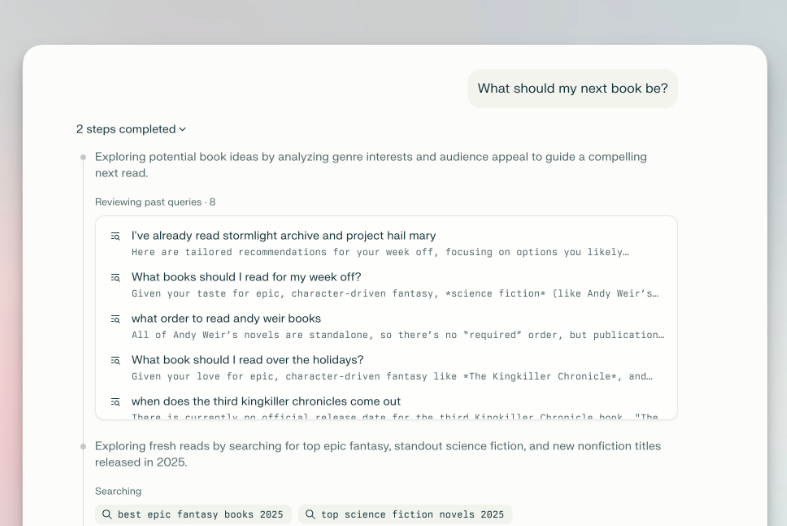
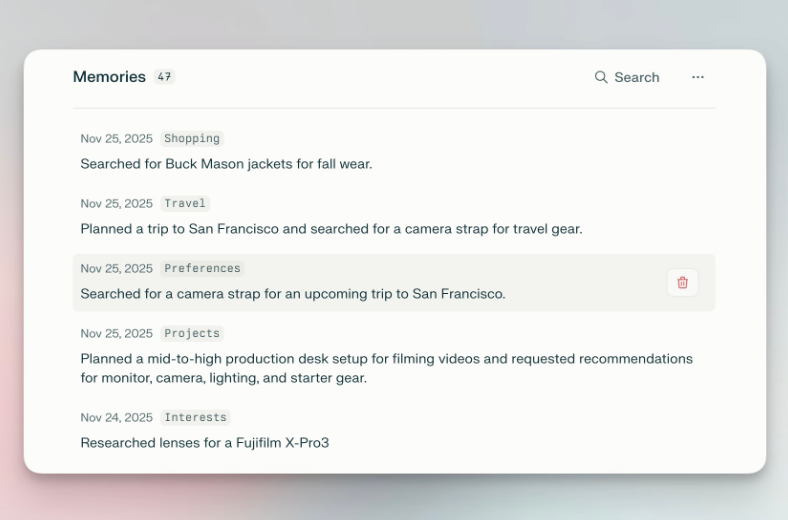
Here’s the important part. The AI retrieves specific context from your memory store rather than just guessing based on patterns. That means it’s pulling the exact details you’ve shared to give you personalized, relevant answers.
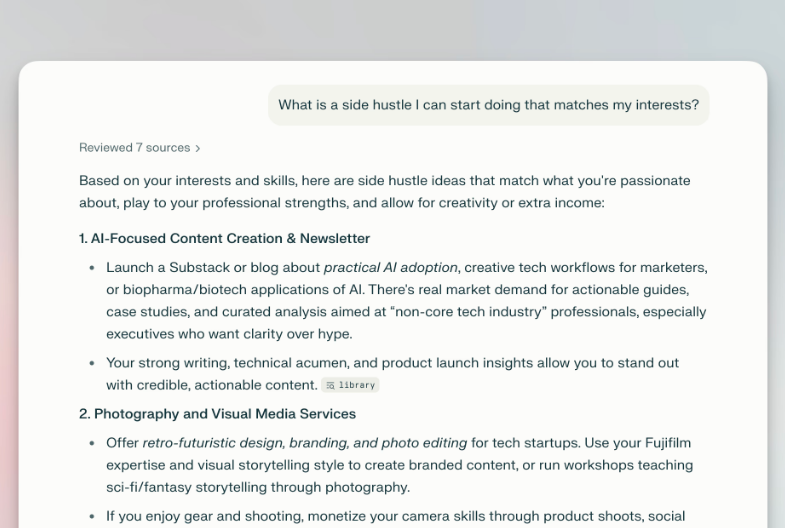
So let’s say you tell the AI assistant you’re building an online course. A few days later, you ask, “What platforms should I use for webinars?” It already knows you’re course‑focused and gives you options that fit. Or maybe you mention you prefer morning client calls, so next time you’re scheduling, it remembers and filters for that. If you’re looking for business conferences or free online trainings, it factors that in automatically.
The more you use it, the sharper it gets. Early conversations lay the foundation, but over time, the AI develops a richer understanding of how to support you.
Source: Perplexity
Setting Up and Managing Your Memory
Getting started is simple. Memory works automatically across all your conversations, but you’re in control of what gets saved.
Here’s how you turn it on and make it work for you:
Log in to your Perplexity account.
Click your account icon at the bottom left.
Select Personalization.
Find the Memory toggle and switch it on or off depending on what you want.
That’s it! Quick and easy. And the best part? You’re always in charge.
You can turn it off anytime. If you’re browsing in incognito mode, memory and search history are automatically disabled. Your data is encrypted, and you can opt out of contributing to model improvement in your account settings.
And here’s what I love: AI assistants with memory work across every Perplexity model. Switch between models for specialized tasks, and your personalization layer comes with you. That means you’re not locked into one system. You can choose the best tool for each job without losing progress.
Examples of Memory in Action
Let me show you how this plays out in business scenarios.
Webinar Discovery
First conversation: “I’m looking for free webinars on social media marketing to grow my audience.” Three days later: “What online trainings should I check out?” The AI remembers your focus on marketing and serves up relevant sessions that match your goals.
Client Gift Shopping
You mention that one of your coaching clients is celebrating a business milestone. Two weeks later: “I’d like to send a thoughtful gift to mark the occasion.” The AI suggests business‑friendly gifts, such as productivity books, branded planners, or tool subscriptions that entrepreneurs love. No need to repeat the details.
Business Travel Planning
You’ve told the AI you prefer conferences on entrepreneurship and AI, plus morning flights with minimal layovers. Next time you ask: “Find me conferences in Miami next quarter and flights to get there.” The AI assistant filters everything to match your preferences, saving you time and stress. This is a practical feature. Helping you cut down on repetition, stay focused, and move faster in your business.
Comet Browser: Your AI Assistant Lives in the Sidebar Now
Now that you’ve seen how memory changes the way you work, let’s talk about the next feature. Because remembering your context is powerful, but what if your assistant could sit right inside your browser while you’re working? That’s where Comet comes in.
Comet brings your AI assistant into the flow of your day. No extra apps, no switching back and forth. It’s right there in your browser, ready to help.
The desktop version came first, and now it’s on Android, with iOS coming soon. Built on Chromium, it feels familiar but adds something new: AI woven directly into your browsing experience.
Source: Perplexity
Key Features That Actually Matter
The Assistant Sidebar
As you browse, your AI sits in a collapsible sidebar, ready to jump in whenever you need it. Need to summarize a long article? Ask the AI assistant. Want to compare products across multiple tabs? The AI can handle that. Researching a topic while managing email? It can reference both contexts.
And here’s the part that saves you time. The AI actually understands the page you’re on. No more copying and pasting text into a separate tool. The context is already there. You ask, it answers, right in the flow of your work.
Tab Management That Makes Sense
Let’s be honest: by the end of the day, most of us have a tab explosion. Fifteen, twenty, sometimes more. It’s overwhelming. Comet helps you manage that chaos with natural language commands that feel intuitive.
Say “close all duplicate tabs” and it’s done. Ask “which of these tabs should I focus on for this project?” and the AI analyzes what’s open and gives you a clear recommendation. Or tell it “summarize all my open tabs” and you get a quick digest without clicking through each one. It’s like having a project manager built into your browser.
Voice Mode for Hands-Free Browsing
Sometimes typing slows you down. With Comet, you can interact entirely through speech. Ask questions, manage tabs, and navigate the web without touching your keyboard. This is especially powerful when you’re multitasking. Maybe you’re reviewing notes, cooking, or moving between meetings. You keep working, and the AI assistant keeps listening.
Built-In Ad Blocker
Distractions are the enemy of focus. Comet includes an ad blocker by default, so you don’t have to install anything extra. You can allowlist trusted sites and block everything else, which means faster page loads and fewer interruptions. It’s a small feature that makes a big difference in keeping your attention where it belongs.
Background AI Assistants for Pro Subscribers
Here’s where things get next‑level. If you’re a Perplexity Max subscriber, you unlock Background Assistants. These are memory‑enabled helpers that can juggle multiple tasks at once while you focus elsewhere.
So, imagine this, you ask the AI assistant to research flight options, draft an email, and find concert tickets. While you’re working on something else, it’s quietly handling all three. When you come back, everything is ready for you to review and finalize. That’s not just convenience but leverage.
Import your bookmarks, passwords, and settings from your current browser with one click
Sign in with your Perplexity account to sync your preferences
The browser is free to use. Pro subscribers get instant access, while free users join a waitlist (most get in within days).
Connecting Your Services
For the best results, connect Comet to your Google services in the Connectors tab in your account settings. That way, it can pull from Gmail and Calendar to help with emails, scheduling, and appointments.
Real-World Use Cases
Email Management
Inbox overload? Instead of scrolling through dozens of emails, ask Comet to pull up messages from a specific person or summarize emails by date. If you need to draft a response, you can tell the AI assistant exactly what to write or ask it to compose a professional reply based on the context.
Research Workflows
With Comet, you can chat directly with websites. Ask specific questions about articles or company pages and get targeted answers pulled straight from the content. No more scanning entire pages for one detail. The AI assistant surfaces what matters so you can move faster.
Flight Shopping
One of my favorite uses: “Find me a flight from Atlanta to Kingston, Jamaica, next week. Show American Airlines or JetBlue. One transfer max. Return ticket.”
Again, the AI searches with those specifics and presents the best matches. It’s not just faster. It’s smarter because you’re in control of the criteria.
Shopping on Perplexity: Research and Buy in One Place
Alright, let’s talk shopping because this is where Perplexity is shaking things up. Instead of juggling tabs and bouncing between sites, you can research and buy in a single seamless flow. It’s like having your own smart shopping partner built right into the conversation.
For Pro users in the US, Buy with Pro means one‑click checkout with free shipping on select products. The goal? Collapse the entire “search, compare, decide, purchase” cycle into a single, seamless experience.
How the Shopping Experience Works
Source: Perplexity
Visual Product Cards
When you search for products, Perplexity doesn’t just throw links at you. It gives you clean, visual cards with everything you need to make a confident choice:
Product images and pricing
Seller information
Short descriptions
Pros and cons of each item
Review‑based insights
Click a card, and you’ll see the deeper details like specs, features, customer reviews, all laid out so comparison feels effortless.
The Search Process
Here’s the fun part: you don’t have to think like a search engine. Just talk to it. Describe what you’re looking for in plain language, and the AI gets it.
Examples:
“Lightweight laptop for work under $700”
“Noise‑canceling headphones for $200 or less”
“Desk lamp with adjustable brightness for reading”
“Smartwatch with fitness tracking under $150”
The more specific you are, the sharper the results. And because the AI remembers the thread, you can refine with follow‑ups until you land exactly where you want.
Snap to Shop: Visual Search
See something you love in a store or a photo? Snap it. Perplexity identifies the item and shows you where to buy similar products online. Even if you don’t know the name, the AI recognizes what’s in the image and finds matches.
Buy with Pro Checkout
For eligible products, Pro subscribers can check out right inside Perplexity. Save your shipping and billing info once, then click Buy with Pro and you’re done. Free shipping included.
If Buy with Pro isn’t available, Perplexity simply redirects you to the merchant’s site to finish the purchase.
Instant Buy with PayPal
Want more flexibility? Perplexity now supports Instant Buy with PayPal, which works with any merchant that accepts PayPal. That means more products, more options, still inside the platform.
How Memory Enhances Shopping
Because of the memory feature, the shopping AI assistant remembers what matters to you. Mention that you live in a cold climate, prefer sustainable brands, or need specific sizing. Those details shape future recommendations automatically.
Less filtering, more relevance, right from the start.
The Merchant Program
Perplexity also launched a free merchant program. Retailers can share product details and even use a free API to power search on their own sites.
Recommendations aren’t sponsored, and Perplexity isn’t taking affiliate commissions right now. Products rank based on authority and relevance. Merchants who provide complete info (availability, reviews, specs) are more likely to show up because the AI has better data to work with.
Shopping Experience Flow
Depending on the merchant, here’s how checkout works:
Pro Shop purchases: Complete checkout inside Perplexity, with taxes calculated and order tracking in the app.
ShopPay integration: Some retailers use Shopify’s checkout screen.
Merchant redirect: If Buy with Pro isn’t available, you’re sent to the retailer’s site.
Right now, there’s no “add to cart” option. The system is designed for quick, single‑item purchases. Perfect when you want to move fast.
How to Actually Use These Features in Your Business
Content Creators and Coaches
Think of memory as your brand’s training ground. Use it to teach your AI your voice, your audience, and the questions you hear most often. Once it knows your messaging framework, it becomes your behind‑the‑scenes content partner. Keeping everything consistent and aligned.
Example workflow:
Tell the AI about your niche, ideal client, and content pillars.
In future conversations, ask for blog post ideas, social media captions, or email sequences.
The AI assistant automatically references what it knows about your brand, so you don’t have to repeat yourself.
E-Commerce Businesses
Comet is your research powerhouse. Use it to analyze competitor websites, track pricing changes, and monitor product trends across multiple tabs at once.
And don’t overlook the shopping features. They give you a window into how customers experience product research in your category. That’s gold for refining your listings, improving your marketing, and staying ahead of the curve.
Service-Based Businesses
Here’s where integration shines. Connect Comet to your Gmail and Calendar to streamline communication and scheduling. Ask the AI to pull emails from specific clients, draft responses, or check your availability for meetings.
Memory adds the personal touch: it remembers client details, project contexts, and communication preferences. That means you can deliver personalized service at scale without burning out.
Solopreneurs Juggling Everything
If you’re wearing all the hats, Background Assistants (for Max subscribers) are a lifesaver. They let you delegate multiple tasks while you stay focused on client work or strategy. Research, scheduling, shopping, and communication can all happen in parallel. No more waiting for one thing to finish before starting the next.
A Few Things to Keep in Mind
Privacy and Security Considerations
Perplexity makes a point of keeping your data encrypted and giving you control over what gets remembered. Still, be smart about what you share. Don’t drop sensitive business data, passwords, or confidential client info into conversations.
And here’s a quick tip: if you want something off the record, use incognito mode. That way, nothing gets saved to memory.
The Learning Curve
Like any tool worth using, these features need a little upfront investment. The first few conversations might feel clunky while you’re teaching the AI your preferences. Stick with it. That effort pays off once the AI assistant starts anticipating your needs and working in sync with you.
Subscription Costs
Here’s the breakdown:
Perplexity Pro: $20/month (or $200/year). This plan gives you the essentials. Shopping features for US users, memory, and access to advanced AI models like GPT‑4o and Claude. Think of it as the starter kit that covers most everyday needs.
Perplexity Max: $200/month (or $2,000/year). This tier is built for power users. You get higher usage limits, the newest models, and priority access to features as they roll out. If you want the cutting edge, this is where you’ll find it.
Comet: Free to download and use. The browser itself is open to everyone, though some advanced features unlock only with Pro or Max.
Now, here’s the real question: Does the ROI make sense for you? If you’re spending hours every week on tasks these tools can take off your plate, the investment pays for itself in time saved. If not, the free tier is a perfectly good place to start experimenting.
Not Perfect Yet
Here’s the deal: no AI tool nails it 100% every single time. Sometimes the AI might miss the mark or need you to rephrase. And yep, the shopping side is still growing, with more merchants being added over time.
It’s all part of the process. Think of these features as super‑helpful sidekicks that are still learning. They’re not magic, but they do make a lot of everyday tasks easier.
Final Thoughts
Here’s the takeaway: these updates aren’t about changing your whole business overnight. They’re about giving you small wins that stack up.
Memory keeps your conversations flowing without the “didn’t I already say this?” moments. Comet keeps your browser calm, not chaotic. Shopping lets you grab the right tools faster, so you can get back to the work that matters. — Learn more about how to boost your productivity with AIhere.
Try them out, see what clicks, and let the rest go. The real value isn’t in using every feature. It’s in finding the ones that make your day feel lighter and your workflow smoother.