


You know that feeling when you’re working on a project with your team, and everyone keeps copying and pasting ChatGPT responses into your group text? One person asks the AI a question, screenshots it, sends it over, then someone else follows up, and now you’ve got a mess of screenshots flying everywhere.
Well, OpenAI just solved that problem with ChatGPT group chat. And honestly? This is a game-changer.
OpenAI rolled out group chats for ChatGPT to everyone. Yes, everyone. Free users, Plus subscribers, and Pro members. If you have a ChatGPT account, you can now invite up to 20 people into a single conversation where you all interact with the AI together.
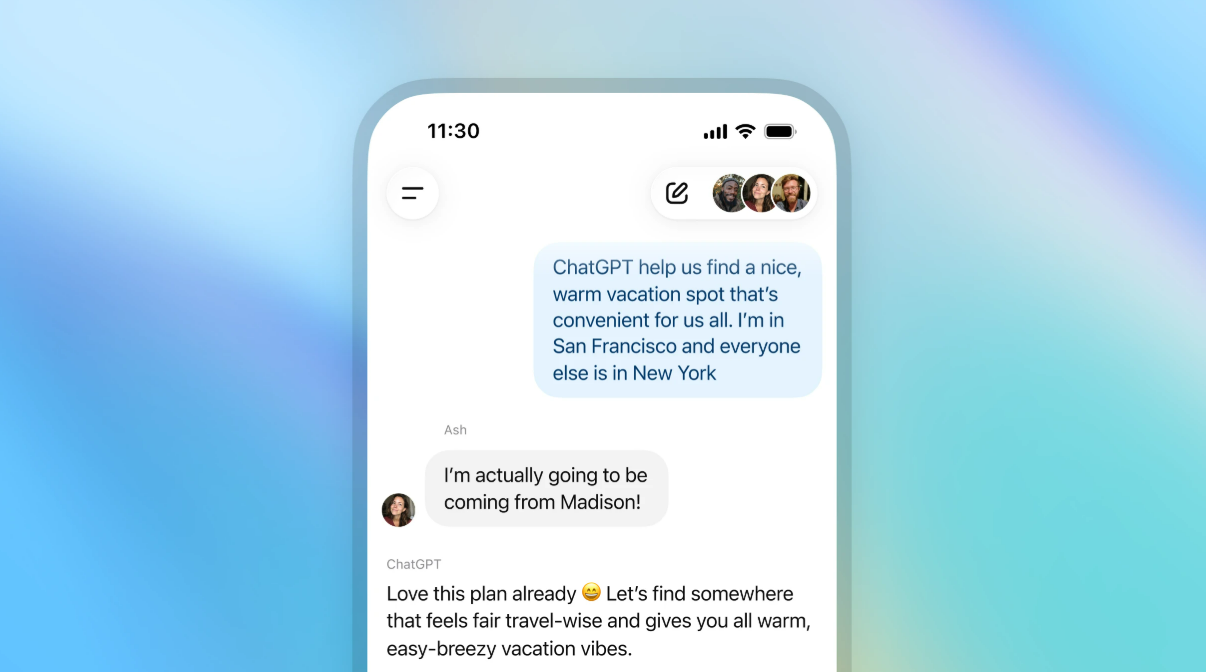
Think about that for a second. You and your business partner can brainstorm product ideas in real time with ChatGPT. Your mastermind group can plan your next event together. Your family can organize a vacation without someone being the designated “AI person” who has to relay all the information.
This is collaboration at the speed of AI. And it finally feels effortless.
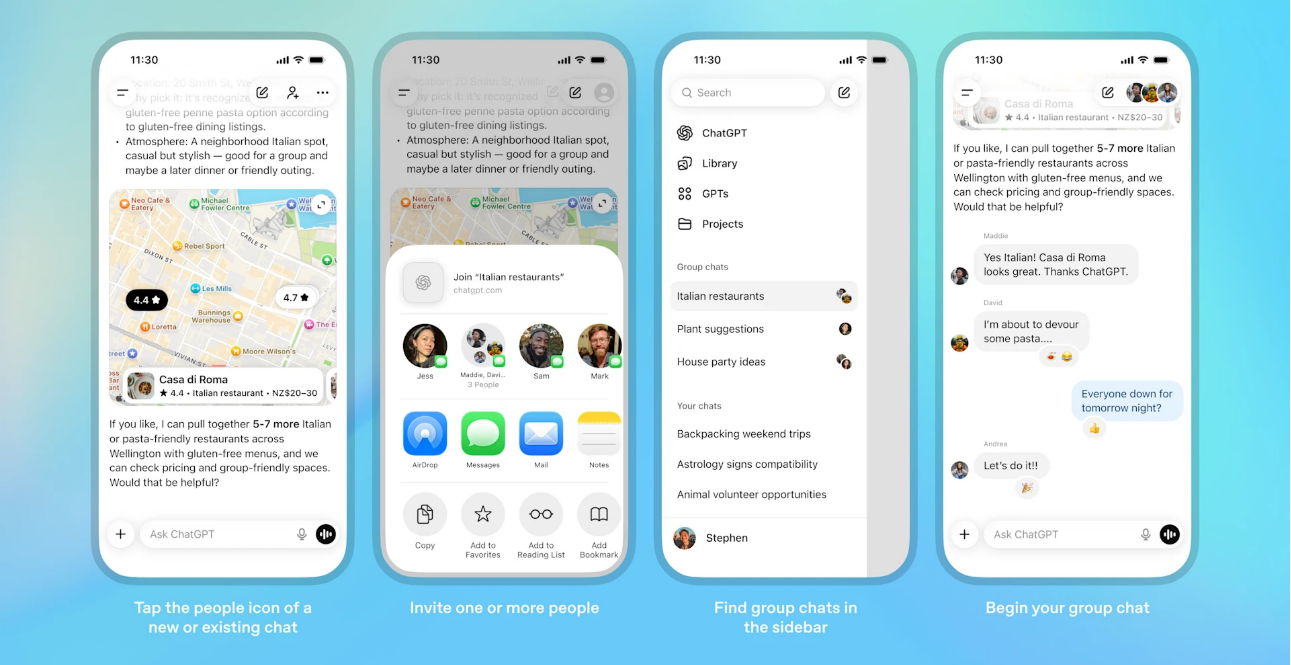
Setting this up takes about 30 seconds. Here’s what you do:

![]()
1. Open ChatGPT and click the people icon in the top right of any chat.
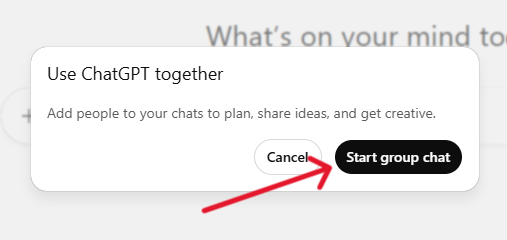
2. Select “Start a group chat” and create a quick profile (name, username, photo).
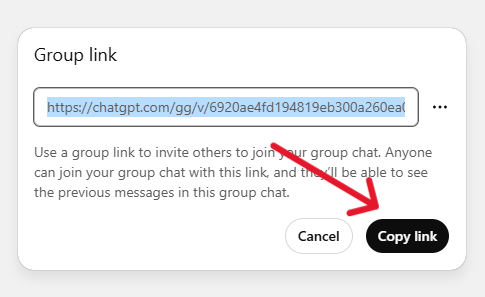
3. Share the invite link with anyone you want in the conversation.
When someone joins through your link, they’ll set up their own profile, and boom. You’re all in the same room with the AI.
One thing I love about this: when you add someone to an existing conversation, ChatGPT makes a copy of it as a new group chat. Your original private conversation stays exactly where it was. Nothing gets mixed up.
Let me break down some ways you could use this starting today.
Content planning made simple: Instead of everyone going back and forth in emails and then separately consulting ChatGPT, you all sit in one space. You start by sharing your launch offer. Your marketing person asks ChatGPT to brainstorm hook angles. Your copywriter picks the strongest one and asks for email subject lines to match. Then your social media manager requests captions that tie the whole campaign together. Everyone builds on what came before, and the entire strategy takes shape in one conversation.
Client collaboration streamlined: Bring them into a group chat, walk them through the AI conversation in real time, get their input on the spot, and refine until it’s perfect. No more sending documents back and forth or scheduling calls to explain what the AI generated.
Mastermind and coaching programs elevated: Create group chats for your members where you can all explore ideas, solve problems, and build strategies together with AI assistance.
Here’s something clever about how ChatGPT group chats work. The AI doesn’t jump into every message. It actually follows the flow of your conversation, figuring out when to respond and when to stay quiet.
So if you’re having a side conversation with your team members, ChatGPT won’t interrupt. But when you need it, just type “ChatGPT” in your message, and it’ll respond. It can even react to messages with emojis and reference people’s profile photos when creating personalized content.
Think about that. You’re planning a team retreat, and you ask ChatGPT to create fun graphics using everyone’s profile pictures. It can do that right there in the conversation.
Now, I know some of you might be thinking: what about my private conversations? What about all those prompts I’ve trained ChatGPT on?
Good news. Group chats are completely separate from your private conversations. Your personal ChatGPT memory doesn’t get shared with anyone in the group. The AI doesn’t use what it knows about you from previous chats, nor does it create new memories from group conversations.
So, all that work you’ve done customizing ChatGPT to write in your voice? That stays yours. When you’re in a group chat, everyone starts fresh together.
The feature comes loaded with the tools you’re already using. You can search the web together. Upload images and files for ChatGPT to analyze. Generate images. Use voice dictation. It’s the full ChatGPT experience, just with more people involved.
Everything runs on GPT 5.1 Auto, which means the AI picks the best model based on what you’re asking and what subscription tier the person has who triggered the response.
Rate limits only apply when ChatGPT responds. So you and your team can message each other as much as you want. The AI’s responses count toward the limit of whoever triggered them.
You can set custom instructions for each group chat. Maybe you want ChatGPT to keep things professional in your work group but be more casual in your friend group. You can customize the tone and personality for each one.
Anyone in the group can remove other participants, except for the person who created the chat. If someone needs to go, any member can make that happen. And if there’s someone under 18 in the group, ChatGPT automatically adjusts its responses to keep the content appropriate for everyone.

ChatGPT group chat is evolving—bringing smarter collaboration, themed chats, and real-time teamwork into one space. | Source: OpenAI
OpenAI has been clear that ChatGPT group chats represent the first step in making the platform more collaborative. They envision the AI playing an even more active role in helping people plan, create, and take action together.
We’re watching ChatGPT evolve from a one-on-one assistant into a genuine team member. And that opens up possibilities we’re only starting to explore.
Here’s what I want you to do right now. Think of one project you’re working on with other people. Maybe it’s a product launch. Perhaps it’s a family event. Or you might be tackling a group assignment or leading a team initiative.
Now open ChatGPT, tap that people icon, and start your first group chat. Invite the people who need to be part of the conversation. Start collaborating.
Because here’s the thing: the people who thrive with AI are the ones who actually use it. They experiment. Others explore new features. Many take time to figure out how these tools fit into their real lives and businesses.
This feature just made AI collaboration easier than ever. So start now, and let it support the way you already think, plan, and create.